YOUR MUSIC. YOUR MACHINE.
Finish your track.
Keep your sound.
Mixing and mastering, on your Mac.
Mix your stems. Master your track.
Hear the difference before you buy.
No upload. No account for the audition.
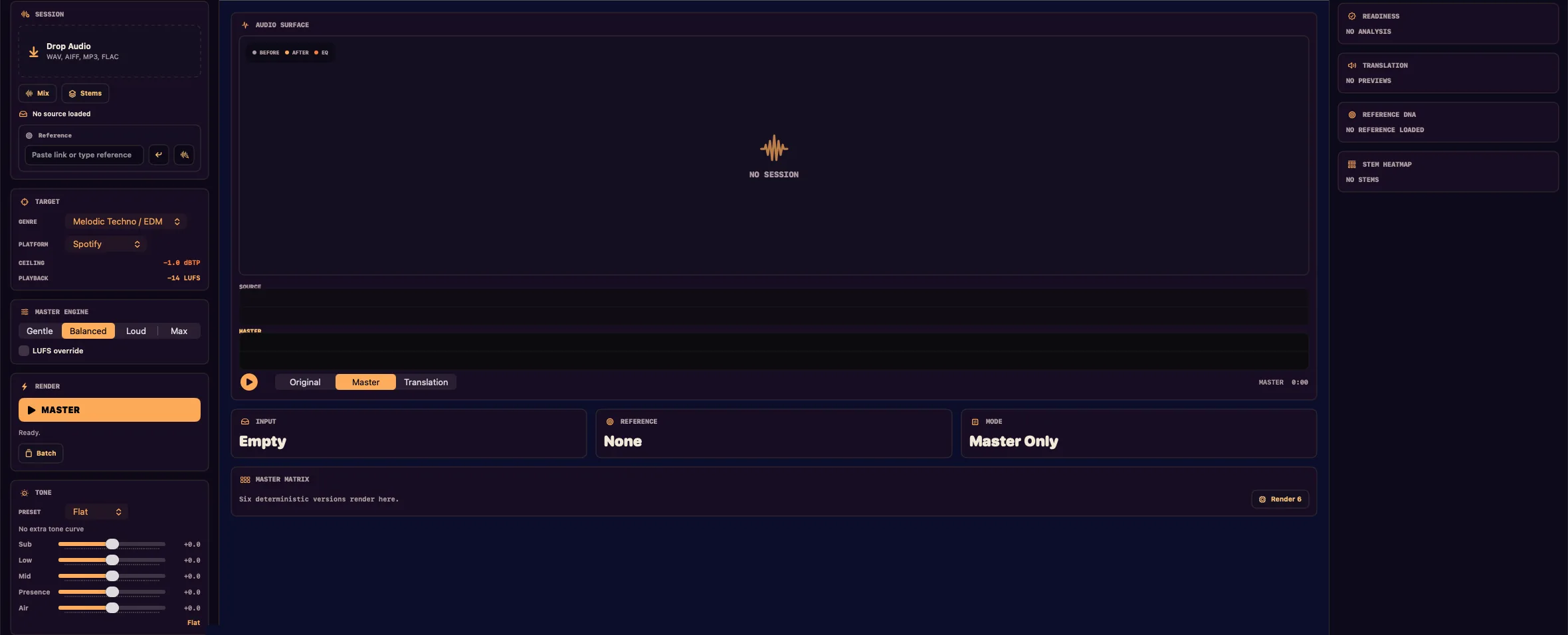
Choose a track, shape its loudness, then compare the original and master.
30-second mastered playback · Audio stays on your device · Full-length export in the Mac app
ONLINE AUDIO MASTERING
Online mastering, without the upload.
Upload services start by sending your track to a server. Sunset Studio works the other way around: the page loads in your browser, then your audio is decoded, processed and played back on your own device. Sunset does not receive the file or its waveform, and you don’t need an account to try it.
The free audition lets you hear up to 30 seconds of the mastered result against your original. When you want the whole song as a file, or the mix still needs work, Sunset for Mac adds full-length export, stem mixing and reference matching for $25, once.
SUNSET FOR MAC
From the first stem
to the final master.
Start with stems when the mix needs work. Start with a stereo track when you’re ready to master.
THE FREE AUDITION
How it works, step by step.
This all happens in the browser window at the top of this page. Nothing to install, nothing to sign up for.
- 01 · ADD
Add your track
Drop a finished stereo mix onto the studio or choose a file. The studio lists WAV, MP3, AIFF, FLAC and M4A, and your browser decodes the file on your device.
- 02 · TARGET
Choose a loudness target
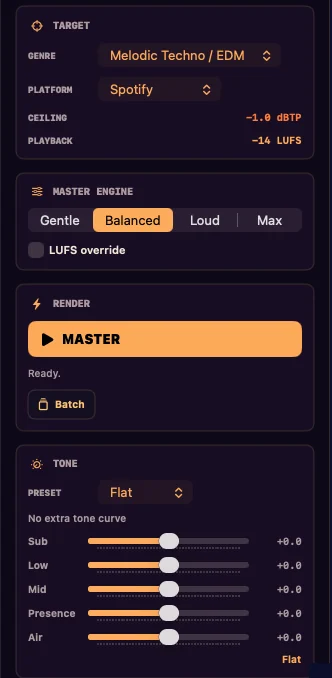
Gentle aims for −14 LUFS, Balanced for −11 LUFS and Loud for −8.5 LUFS, all under a −1 dB ceiling. Balanced is the default.
- 03 · MASTER
Run the chain
Sunset trims to about −6 dB of peak headroom, cuts rumble at 28 Hz, controls mud at 260 and 600 Hz, adds presence and air, and glues the track with 2:1 compression. Lows below 120 Hz fold to mono. Light saturation and a soft clip lead into the ceiling. It re-renders up to five times to land near your target.
- 04 · COMPARE
Hear both versions
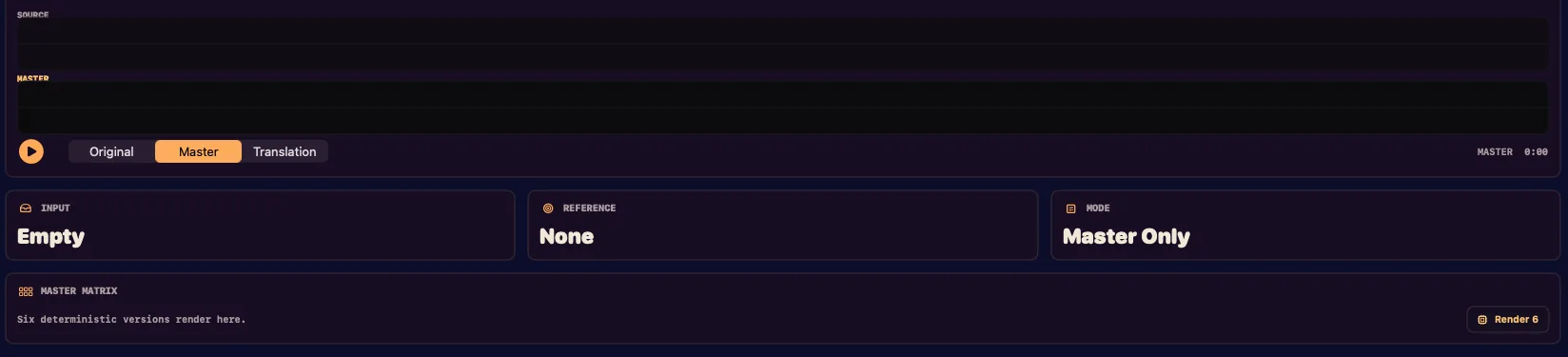
Switch between the original and the master while the studio shows loudness before and after, plus the peak. The master plays for up to 30 seconds; your original plays in full. The two aren’t level-matched here, so listen for tone and punch, not just volume.
- 05 · KEEP
Take the full song to the Mac
The browser audition doesn’t export a file. The separate Sunset Mac app exports the full-length master, and everything still runs on your Mac with nothing uploaded.
Better input, better master: bounce with the limiter off your master bus and leave some headroom. The premaster guide has the checklist.
Try your track free
THE MASTERING CHAIN
What mastering does to your track.
Mastering is the last stage before release. It takes a finished stereo mix and sets its final tone, dynamics, stereo image and loudness, so the track holds up on the systems people listen on. Here is what Sunset for Mac does, in order, and what each stage is set to.
Measure
Reads integrated loudness to ITU-R BS.1770, 4× oversampled true peak and a third-octave spectrum before anything changes.
Tone
Corrective EQ fitted to a reference track, a saved Reference DNA profile or one of eight genre targets. Your five-band tone control (Sub, Low, Mid, Presence, Air) rides on top.
Glue
Gentle three-band compression at 2:1, split at 120 Hz and 2.5 kHz. Thresholds come from your track’s measured level, so only the loud moments get touched.
Stereo image
Width follows the reference or genre target. The low end folds to mono below a set point, from 60 Hz for orchestral up to 120 Hz for club styles.
Saturation
A small parallel blend for density: 6% at Gentle, rising to 20% at Max.
Loudness and limiting
Gain to your target, an optional soft clip, then a lookahead true-peak limiter. If anything still pokes over the ceiling, a static trim brings it under.
Dither
Noise-shaped TPDF dither to 24-bit, so quiet detail stays clean.
It shows its work
Each render writes plain-English notes: what changed, by how much and why. The same input and settings give the same master, byte for byte. The chain is measured DSP and hand-tuned targets, with no trained model and no cloud service.
Fair comparisons
Equal-loudness A/B measures both versions and turns the louder one down, so you compare tone, not level. Hear what changed plays only the difference between your original and the master.
Six versions, side by side
Master Matrix renders Clean, Loud, Club, Warm, Bright and Vocal Forward versions, then scores each one and lists its loudness, true peak, range, crest and codec peak.
Checks before you ship
Audio Doctor runs release checks on true peak, platform loudness, codec clipping, mono correlation, low-end width, dynamics and DC offset, and explains problems in plain English. Translation previews score your master for a phone speaker, earbuds, a car, a club system and mono Bluetooth, and let you hear a simulation of each.
Reference matching
Load a reference file and Sunset captures its third-octave tonal balance, loudness and stereo width, then fits your track toward them. Save that as a Reference DNA profile to reuse across masters and batches without keeping the audio. Paste a SoundCloud, YouTube or Spotify link and Sunset reads only the public title and artist to pick a style target; it never downloads the audio.
STEM MIXING · MAC APP
What stem mixing does.
Mastering can’t rebalance a buried vocal or a kick fighting the bass. That’s a mixing job. Bring aligned stems from any DAW and Sunset builds a starting mix you can keep shaping. Stem mixing is in the Mac app only; the browser audition masters one stereo file.
Roles from filenames
Sunset reads each filename and assigns one of 13 roles: kick, sub bass, bass, drums, clap/snare, hi-hat, vox, lead, pluck, synth, pad, FX or other. You can override any of them before rendering.
A balance to start from
Role-aware peak targets set the first balance. Then adjust gain, constant-power pan, mute and solo per stem, with a pre-master headroom guard on the bounce.
Room between parts
Corrective EQ, cross-stem masking analysis with carve suggestions, kick-to-bass ducking and vocal priority make space where parts collide.
Buses, inserts and sends
Drum, instrument and vocal buses with glue compression, parallel blend and imaging, plus channel strips, insert slots and shared send returns.
Nine mix styles
Styles set how hard parts duck and punch, from EDM Foundation and Peak-Time Techno to Jazz Combo and Cinematic Score, which skip sidechain pumping altogether.
A clean handoff
Export Mix writes the stereo balance with no limiter, loudness target or release dither. Send to Mastering opens that mix in a new workspace, where the chain above takes over.
LOUDNESS AND EXPORT
Loudness targets and export formats.
Two figures decide how a master travels. LUFS is how loud it measures over time. True peak is the highest point it reaches, including between samples, where an ordinary peak meter can miss it. Sunset sets a target for both and reports what the master actually hit.
Target meter
Press a destination in the table and the needle swings to its target.
Delivery Pack targets
Delivery Pack renders your finished master once per destination and labels each file. It runs corrective passes to land within 0.5 LU of each target, and says so when the ceiling won’t allow it.
| Destination | Loudness | True-peak ceiling |
|---|---|---|
| Spotify | −14 LUFS | −1 dBTP |
| Apple Music | −16 LUFS | −1 dBTP |
| YouTube | −14 LUFS | −1 dBTP |
| Tidal | −14 LUFS | −1 dBTP |
| Amazon Music | −14 LUFS | −2 dBTP |
| SoundCloud | −9 LUFS | −1 dBTP |
| Club / DJ | −6 LUFS | −1 dBTP |
Why these numbers: How loud should my master be? and True peak explained.
Loudness settings
The browser audition has three settings. The Mac app has four, and it lets you set the number yourself.
| Setting | Browser audition | Mac app |
|---|---|---|
| Gentle | −14 LUFS | −13 LUFS |
| Balanced | −11 LUFS | −10.5 LUFS |
| Loud | −8.5 LUFS | −8.5 LUFS |
| Max | Not offered | −7 LUFS |
On the Mac you can also override loudness from −16 to −5 LUFS, or let a reference track set it. The platform you pick sets the true-peak ceiling. The browser readout uses K-weighted, gated loudness and labels its peak as approximate; the Mac app meters to ITU-R BS.1770 with 4× oversampled true peak.
What the Mac app exports
The browser audition plays; the Mac app writes files.
- WAV or AIFF
- PCM at 16 or 24-bit.
- FLAC
- Lossless at 16 or 24-bit.
- AAC
- Lossy, in an .m4a file.
- Sample rate
- Keep the source, or convert to 44.1 or 48 kHz.
- Batch
- A whole set mastered to one folder as 24-bit WAV.
- Proof
- A plain-text or JSON proof report, a report-card image and a release bundle alongside the audio.
MP3 export isn’t offered because no licensed MP3 encoder ships in the app. AAC is the lossy option, and MP3 files still work as input.
WHO IT’S FOR
Who Sunset fits, and who it doesn’t.
A good fit if
- You finish music at home.You have a stereo bounce and want a master you can check against real loudness and peak targets.
- You make electronic or club music.The defaults start from melodic techno and EDM, with mono low end, kick-to-bass ducking, club targets and low-end checks. Genre targets also cover pop, hip-hop, rock, acoustic, jazz and orchestral.
- You release through a distributor.Export the format your distributor asks for, with one labeled file per destination if you need them.
- You’d rather not upload unreleased music.Your audio stays on your own device, in the browser and in the app.
Probably not for you if
- You need a Windows app.The browser audition runs in a compatible Windows browser, but the native Windows app is not available yet.
- You need MP3 files out.The Mac app exports WAV, AIFF, FLAC and AAC.
- You want a plug-in inside your DAW.Sunset works from bounced files, and the download ships no plug-in.
- You want a person to master it.Sunset is software, so no engineer listens to your track.
- You want a free full-length file.The browser audition plays up to 30 seconds of the master and doesn’t export.
ON-DEVICE VS. UPLOAD
Sunset vs. online upload services.
We make Sunset, so read this with that in mind. Upload services do the same job a different way, and their plans and features vary, so this table sticks to what follows from where the processing happens. Check any service’s current terms before you choose.
| Question | Sunset | Upload-based service |
|---|---|---|
| Where your audio is processed | On your device, in the browser tab or the Mac app. | On the service’s servers. |
| What leaves your machine | No audio and no waveform. The privacy policy lists what the website does collect. | Your audio file, when you upload it. |
| Waiting on a transfer | None. There’s nothing to send. | Depends on your file size and connection. |
| What render speed depends on | Your own device. | The service’s servers. |
| Trying it | Free audition of up to 30 seconds, with no account. | Set by each service. |
| Paying for it | $25 once for the Mac app, with no subscription. | Set by each service. Check its current plans. |
| Mixing stems first | Included in the Mac app. | Varies by service. |
On-device has trade-offs too. Render time depends on your own machine, the full workflow needs a Mac on macOS 14 or later, and your files are yours to back up, so keep your originals.
BEFORE YOU START
Online mastering questions, answered.
What is online audio mastering?
It means finishing a stereo mix through a website instead of a studio session: the final tone, dynamics and loudness get set, usually by software. Upload services do that on their own servers. Sunset Studio does it in your browser, on your device.
What’s free in the browser?
Add your audio, choose a loudness target, and hear up to 30 seconds of the mastered result. Original playback is available for comparison. The browser audition does not include full-length file export.
Does my audio get uploaded?
No. The studio processes your audio in your browser on your device, and the Mac app also processes audio locally. Sunset does not receive the file or its waveform. The website has its own analytics, checkout and support data, which the privacy policy lists.
How is the Mac app different?
The Mac app adds the full session workflow: stem mixing, stereo mastering, reference matching, and full-length export. See mixing or see mastering before buying.
How much does Sunset cost?
The browser audition is free. Sunset for Mac is $25 once: one purchase, no subscription. If it doesn’t work on your Mac and support can’t fix it, reply to your Stripe receipt within 14 days of purchase and you’ll be refunded.
What do I need to run the Mac app?
Sunset for Mac requires macOS 14 or later. The app is notarized, and after purchase you use your purchase email in your account to download it.
Which audio files can I use?
The browser studio lists WAV, MP3, AIFF, FLAC and M4A, and your browser does the decoding. The Mac app masters a stereo mix in WAV, AIFF, MP3 or FLAC, and mixes from a set of aligned stems.
Can I export an MP3?
No. MP3 export is not offered because no licensed MP3 encoder ships in the app. The Mac app exports WAV, AIFF, FLAC and AAC (.m4a), and MP3 files still work as input.
How loud should my master be?
It depends where it will play. Spotify and YouTube reference around −14 LUFS and Apple’s Sound Check sits near −16, so hotter masters get turned down on playback. Club masters commonly land around −7 to −5 LUFS because a DJ set has no normalization. The loudness guide walks through the choice.
What is a true-peak ceiling?
True peak estimates the highest point the audio reaches between samples, which a sample-peak meter can miss. A ceiling keeps those peaks under a set level so they don’t clip on playback. Sunset’s delivery targets use −1 dBTP, except Amazon Music at −2 dBTP. True peak explained has the detail.
Can I match my master to a reference track?
Yes, in the Mac app. Load an audio file to capture its tonal balance, loudness and width, or paste a SoundCloud, YouTube or Spotify link and Sunset uses the public title and artist to pick a style target. It never downloads the audio.
Does Sunset use AI?
The mastering chain doesn’t. It is measured DSP with reference matching and hand-tuned genre targets, and in the Mac app the same input and settings give the same master. The website’s support assistant is separate and does use AI to draft answers.
Do I need an internet connection?
The browser studio needs one to load the page, then processes on your device. The Mac app renders offline. It goes online only for update checks and to read the title and artist of a reference link you paste.
Does it work with my DAW?
Yes, if your DAW can bounce a file. There is no plug-in or sync to set up: bounce from FL Studio, Ableton Live, Logic Pro, Pro Tools, Reaper or anything else, then drag the file onto Sunset.
Can I release music I master with Sunset?
Yes. Everything you master with Sunset, in the app or the browser Studio, is yours, including for commercial release. The license is for personal use on your own machines and doesn’t let you redistribute or resell the app itself.
Can I use Windows?
You can try the browser audition on a compatible Windows browser. The native Windows app is not available yet.
MAKE YOUR NEXT LISTEN COUNT
Make your next track better.
Give your master a better starting point.
How to prepare the mix before you master.
Read the guide →02 / LOUDNESSLouder isn’t the whole story.
Choose a loudness target that fits the track.
Read the guide →03 / LISTENINGKnow what you’re listening for.
Use a reference track to guide your decisions.
Read the guide →